Your complete guide to vacation smart energy savings


When you leave town, your home doesn’t stop using energy. But with the right setup, your home can use far less energy while you’re away, helping lower your bill. Plus, you can keep your home more secure until you return.

Your complete guide to vacation smart energy savings

Your complete guide to vacation smart energy savings


When you leave town, your home doesn’t stop using energy. But with the right setup, your home can use far less energy while you’re away, helping lower your bill. Plus, you can keep your home more secure until you return.

Published Date: April 02, 2026

This guide shows Texas homeowners how to reduce vacation energy use by adjusting smart thermostat settings, managing HVAC and water heater efficiency, unplugging unnecessary devices and using smart home automation to control energy remotely. Whether you’re golfing with friends, taking your kids to the beach or on a romantic getaway for two, you can lower electricity costs and protect your home without making major changes to your lifestyle.

How do you save energy while on vacation?

If you’re traveling, choosing to adjust your thermostat by 4-10°F, unplugging non-essential electronics or using smart home automation may help reduce your home's energy use, depending on seasonal conditions and trip length.

Start with a pre‑vacation energy audit

Before you start adjusting thermostats or disconnecting devices, the first step is to figure out where your home might be secretly wasting energy.

How to identify your home’s hidden power drains

Depending on the size of your home, you should start by conducting a room-by-room energy assessment. Start in one room and walk through your home to look for hidden energy drains, often called “vampire loads.” Take note of:

  • Appliances that stay plugged in all day and night
  • Chargers left in outlets
  • Devices that run automatically on timers
  • Electronics with standby lights or glowing displays

Top 10 household energy drains in Texas

The top 10 most common power‑hungry appliances and systems that can use energy even when they’re "off" or in standby mode are:

  1. Central AC: 1,000-2,000 kWh per month (summer peak)
  2. Electric furnace: 1,500 kWh per month (winter peak)
  3. Water heater: 300-400 kWh per month
  4. Refrigerator: 150 kWh per month
  5. Desktop computer: 60-250 kWh per month (depending on usage)
  6. Clothes dryer: 75 kWh per month
  7. Lighting: 50-100 kWh per month (varies by bulb type and usage)
  8. Electric oven: 58 kWh per month
  9. Television: 27-57 kWh per month
  10. Dishwasher: 30-50 kWh per month

One of the simplest energy-saving tips to cut vacation energy waste is to turn off or remove anything plugged into an outlet that doesn’t need to run while you’re away. Even small appliances draw power in standby mode, which can add up over time. So, before you leave, remove high‑use electronics and appliances from their power supply to prevent unnecessary standby energy use while your home is empty.

Set a baseline for your home’s energy use

If you have a smart meter or an energy monitoring app, check your typical daily usage before leaving your home. Understanding your daily energy use gives you insights into:

  • Normal energy patterns in your home
  • Which devices consume the most power
  • How much you might realistically save during your trip

For Texas homeowners, it’s especially useful to flag energy spikes during peak electricity hours and document your biggest energy drains now so you can compare your savings when you return from your trip.

Set your HVAC for vacation energy savings

Your heating and cooling system is almost always the number one source of vacation energy waste. Depending on the length of your trip, you typically don’t want to turn your HVAC off completely. But you do want to cut any unnecessary runtime while keeping your home comfortable.

Why should I still run my HVAC when I’m not home?

Running your HVAC while away to maintain reasonable, comfortable temperatures and humidity is important because extreme heat, cold or moisture can:

  • Affect indoor air quality
  • Damage electronics, furniture or wood floors
  • Encourage mold or mildew growth
  • Make the home uncomfortable or unsafe for pets or plants that remain inside

Ideal thermostat settings by season and trip length

What’s the best thermostat setting for vacation energy savings? According to the U.S. Department of Energy, setting your thermostat 7°F to 10°F higher or lower than normal while you’re away can reduce heating and cooling costs by up to 10% per year. Making this adjustment is especially helpful in Texas homes where long, hot summers and sudden cold snaps make HVAC systems one of the highest energy users.

If you keep your home at 78°F in summer, for example, you would raise it between 85°F to 88°F before leaving for a one- to three-day trip. If you set your temperature to 68°F in winter, you would then lower it to 58°F to 61°F before leaving for a shorter vacation. For longer trips, use full "Vacation Mode" settings for weeklong getaways, and consider deeper temperature setbacks with humidity control for vacations lasting two weeks or more.

Trip-length guidance:

  • Weekend trips (1-3 days): Slightly adjust the temperature
  • 1 week away: Use full vacation settings
  • 2 weeks or more away: Consider deeper setbacks with humidity control

Smart thermostat programming for maximum savings

Smart thermostats are among the most powerful tools, especially in Texas weather, for cutting and managing energy use while you’re away. With a smart thermostat, you can:

  • Adjust settings if the weather changes without leaving your vacation spot
  • Monitor temperature remotely to make sure conditions stay safe and comfortable
  • Pre-cool or pre-heat the house before you return, so you walk into comfort without wasting energy all day
  • Set vacation schedules automatically so your HVAC system runs only when needed

Lower water heater energy use while you’re away

Water heaters can use more energy than you may realize, even when no one is using hot water. Managing your water heater while you’re away can lead to noticeable savings on your electricity or gas bill.

Water heater shutdown vs. temperature reduction

A shutdown stops the water heater from using energy altogether, while a temperature reduction lowers energy use without fully turning the system off. Before leaving for your trip, adjust your water heater based on how long you’ll be away:

  • For trips longer than 3 days, some Texas homeowners choose to turn off their water heater entirely. 
  • For shorter trips, keeping your water heater's temperature at or above 120-140°F helps prevent bacterial growth while maintaining efficiency.

Tankless systems, which are common in newer homes in Texas, usually allow scheduled temperature adjustments with the use of an app or control panel. During winter, don’t shut off water heaters completely in case your pipes freeze. Instead, reduce the temperature to prevent potential damage.

Smart water heater controls and scheduling

Smart water heaters make it easy to manage settings even if the weather in Texas flips from warm to freezing while you’re gone. Common features include:

  • Remote shutoff from your phone or smart home app
  • Customizable temperature schedules for weekdays, weekends or vacation periods
  • “Vacation Modes” that automatically lower energy use during extended absences
  • Energy monitoring to see exactly how much you’re saving

Combined with HVAC and appliance strategies, taking these actions can contribute to meaningful energy cost savings, even while you’re away.

What to keep connected

Not every device should be disconnected. Some should stay on to keep your home safe, secure and functional, such as:

  • Essential lighting timers
  • Refrigerators and freezers
  • Security systems
  • Smart locks and cameras
  • Wi-Fi routers (if using remote monitoring)

For extended getaways, consider emptying the fridge and pulling the plug on any secondary refrigerators or garage freezers to save additional energy.
Take advantage of smart home tools to manage vacation energy

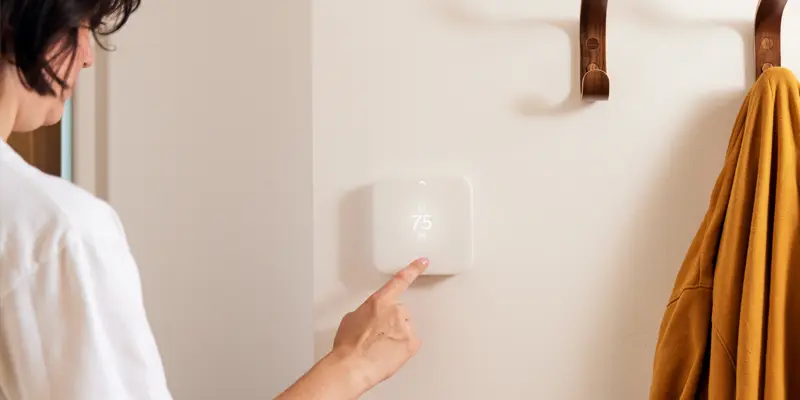
Smart home devices make it easier for Texas homeowners to save energy while on vacation without the need for constant check-ins. Automated scheduling and smart scenes let you manage multiple devices at once, helping reduce energy use while supporting home safety and security during your trip. For homeowners who want an all‑in‑one approach, systems like Vivint make it easier to manage energy, security and automation together while you’re away.

Remote monitoring and control systems

Most smart home platforms, like Alexa, allow you to create a “Vacation Mode” automation that adjusts key settings automatically while you’re away. Instead of managing each device individually, a single scene can help your home run more efficiently and securely until you return. Typically, “Vacation Mode” can help you:

  • Pause appliance schedules 
  • Raise or lower the thermostat automatically
  • Run lights on a schedule for security
  • Send alerts if energy spikes occur
  • Turn off non‑essential plugs and appliances

Helpful smart home device tools include:

  • Smart plugs: Plug in individual devices like TVs, gaming consoles or coffee makers to turn them on/off remotely or on a schedule.
  • Smart switches: Control ceiling lights or hardwired appliances without rewiring; great for vacation lighting automation.
  • Smart outlets and smart power strips: Replace standard outlets and power strips to monitor energy use and schedule connected devices.
  • Whole-home energy monitors: Track overall electricity use in real time, identify high-usage devices and spot energy spikes while you’re away.

To set up a simple “Vacation Mode” routine, you can:

  • Add a thermostat setback to reduce HVAC energy use
  • Create a scene called “away on vacation”
  • Enable motion or energy alerts for real-time monitoring
  • Schedule porch or indoor lights to run 8-11 p.m. for security
  • Turn off smart plugs for TVs, gaming consoles and other entertainment devices

Once set up, these automations work in the background, helping you save energy, monitor your home and enjoy your vacation with fewer things to worry about.

Safety considerations while maximizing energy savings

Saving energy on vacation is important, but home safety should come first. Smart energy strategies should never compromise security or the integrity of your home.

Maintain security system operations

Before you leave, make sure your home stays protected. Ensure that:

  • Cameras stay powered so you can monitor activity remotely
  • Alarm systems remain active to detect intrusions
  • Wi-Fi stays stable for uninterrupted remote access
  • Outdoor lighting runs on timers to make the home look occupied

Smart lighting schedules help prevent energy waste and keep your home secure by deterring potential intruders.

Prevent frozen pipes and equipment damage

Take extra steps to protect your home from cold snaps while you’re away:

  • Insulate exposed pipes in garages or crawl spaces
  • Keep winter heating at 55-60°F to prevent pipe freezing
  • Leave cabinet doors open under sinks during freezing temperatures
  • Use smart leak detectors for instant alerts if a pipe bursts or water is detected

Surge protectors can safeguard sensitive electronics during Texas storms, protecting both your devices and your energy investments, just in case.

How to restart your home efficiently after vacation

Vacation energy savings don’t stop the moment you walk through the door. How you restart your systems can help you protect your home, maximize your energy efficiency and track your savings.

Gradual system restart procedures

Give your home a gentle wake-up before you arrive:

  • Pre-adjust the thermostat 2-4 hours early so your home is comfortable without making the HVAC work overtime
  • Turn your smart water heater back on remotely so hot water is ready when you return
  • Check for unusual energy spikes to catch any issues before they become expensive surprises

Avoid cranking the HVAC to extremes immediately, as this can stress the system and unnecessarily spike your energy usage.

Post-vacation energy usage analysis

Once you’re back, you can create a quick energy report by comparing your baseline daily usage to your vacation-period usage and measuring the actual savings achieved.

If the numbers aren’t as high as you expected, check for common culprits such as:

  • Devices left on by accident
  • HVAC cycling more than necessary
  • Water heater not fully reduced

Use what you learn to tweak your strategy for next time.

Vacation energy savings can add up quickly

When you leave town, your home doesn’t stop using energy, but with the right setup, it doesn’t have to waste it either. By focusing on a few high‑impact areas like smart HVAC settings, water heater management, unplugging unnecessary devices and simple automation, you can lower your energy use and protect your home without changing how you travel. This way, you can travel with peace of mind and return to lower energy use.

vivint smarter home bundle tstat 65

Reliant customers, get power and protection at your fingertips with the free Reliant Smarter Home Bundle featuring Home Base Essentials from Vivint.

Learn more about the Smarter Home Bundle  


Frequently asked questions

Show all answers

For the best vacation energy savings, you can set your thermostat 4-6 degrees higher in summer or lower in winter than your normal setting. For trips longer than 3 days, consider turning your HVAC off until you return. Both options can help reduce unnecessary household cooling or heating while you're away.

Switching your water heater to “Vacation Mode” or a lower-heat setting is an easy way to cut energy use while you’re on vacation. This reduces standby energy consumption without the hassle of fully shutting down your water heating system.

You can keep essential devices, like your refrigerator, security system and Wi-Fi router, plugged in while you're away from your home. However, other appliances, like your TV or game consoles, can be unplugged to reduce standby power usage.

Adjusting your thermostat, disconnecting nonessential electronics and using smart home settings can significantly lower your electricity use while you’re gone. Many households see noticeable reductions on their energy bills during extended trips.

View more +

Welcome back! Pick up where you left off.

Confirm your plan and zipcode
Select from 3 of our most popular plans for your zipcode
2 days free per week
100% solar

Reliant Flextra Credits 24 plan

Get your 2 highest-use days a week FREE + $200 in bonus bill credits for extra savings.


Fixed rate
Price protection

Reliant Secure Advantage 24 plan

Straightfoward plan with a locked-in energy charge.


For renters
Popular in your area

Reliant Apartment 12 plan

Designed exclusively for smaller spaces.


Term
2 Months
Rate
Fixed

Pricing Details

USAGE
AVG PRICE / KWH
500 kWh
1,000 kWh
2,000 kWh

Early cancellation fee

Plan Features
Product

Pricing Details

USAGE
AVG PRICE / KWH
500 kWh
1,000 kWh
2,000 kWh

Early cancellation fee

*Average Price per kWh assumes noted usage per month and specific LP&L Delivery Charges (i.e., Residential Service or Residential Distributed Renewable Generation Service). For additional information regarding plan pricing and other terms, please see the Electricity Facts Label, on the Plan Details page. Price shown is for new customers only.